
The short version
- 01Separate browser attempts, accepted requests and downstream actions.
- 02An unanswered request may already have been accepted.
- 03A retry and a deliberate new enquiry need different handling.
Prevent duplicate lead form submissions by treating repeated clicks and repeated requests as separate problems. Show a clear sending state in the form, and make the receiving system recognize a retry of the same enquiry. Disabling a button alone does not establish that only one lead, notification or follow-up will be created.
Start with a simple acceptance test: one intended enquiry should produce one accepted request and the expected downstream actions. A deliberate new enquiry from the same person should still be possible. The examples below are design requirements and test cases, not claims that every form builder implements them automatically.
Find where the duplicate is created
Two rows in a lead list can have different causes. The browser may have sent twice, an automation may have processed one event twice, or a visitor may genuinely have submitted two requests. Investigate the path before changing a field rule.
Use an authorised test environment with a receiving inbox or test record you can inspect. Give each scenario a harmless, recognizable label in a test-only field or supported reference. Do not put real customers through repeated submissions just to find the failure.
Record the number of browser submission attempts, accepted requests and downstream actions separately. If one accepted request produces two notifications, blocking a second click will not fix that delivery problem. If the browser sends twice but the service accepts only once, the interface may still need clearer feedback even though the receiving record is correct.
Show that the first action is being processed
After a valid submission starts, show a message such as "Sending your request" and prevent another activation of the same operation while it is pending. Apply this to the form's submission path, including keyboard submission, rather than only to a pointer click on one button.
Keep the pending state connected to the action the person just took. A spinner elsewhere on the page may not explain why the form appears unresponsive. Avoid showing a success checkmark while you are still waiting for the receiving service.
The W3C guidance on status messages explains how status changes should be available to assistive technology without requiring focus to move to them. Test the actual announcements and keyboard path; adding a loading animation does not establish accessibility.
Make the pending state temporary. A request that receives a confirmed rejection should provide a useful correction or recovery action, while a request with an unknown outcome needs different wording. The lead form error-message guide covers those distinctions in more detail.
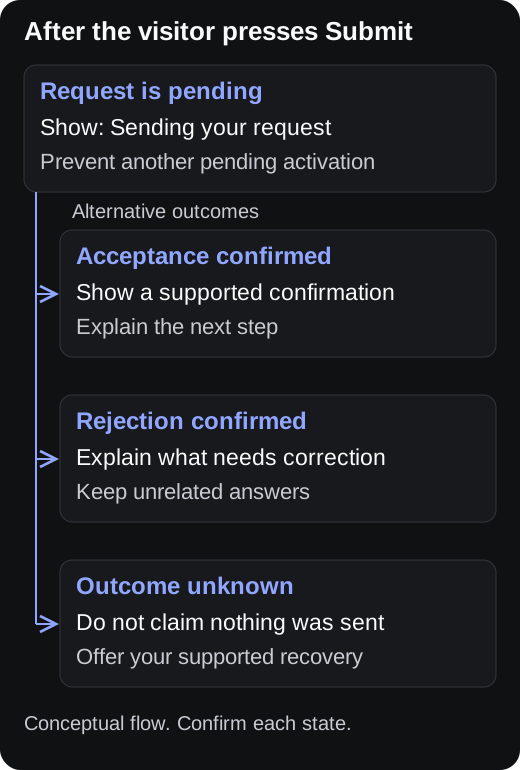
Conceptual state flow. The labels must match the outcomes your receiving service can confirm.
Do not turn a timeout into a false failure
Imagine a visitor sending a quote request on a train. The service saves the enquiry, but the connection drops before the browser receives the confirmation. A second press of Submit may now repeat an operation that already succeeded.
The interface should not claim "Nothing was sent" simply because it did not receive an answer. A suitable message might be "We could not confirm your request" followed by the recovery action your system actually supports. That could be a status check, a safe retry or a help route.
For a custom JavaScript form, MDN's Fetch documentation distinguishes network errors from HTTP error responses. A fulfilled fetch promise does not mean the application accepted the enquiry; inspect the response status and the application's documented result before displaying confirmation.
Keep the entered answers available during recovery where the implementation can safely do so. Do not make the visitor reconstruct a detailed enquiry merely because the interface lost the response. For multi-step forms, also test the Back and answer-preservation path.
Give retries an identity the server understands
Ask the developer or integration owner how the receiver distinguishes another attempt at the same submission from a new submission. One common approach is an operation identifier that stays the same when the client retries an unchanged request. The server records the operation and handles a repeat according to its documented contract.
MDN defines idempotency as repeated identical requests having the same intended effect as one request. A POST request does not provide that guarantee by itself. Using POST for a form is normal, but any retry protection needs an implementation behind it.
The Amazon Builders' Library discussion of safe retries explains why caller-provided request identifiers help express intent. Reusing an identifier with different parameters requires explicit handling. Generating a fresh identifier for every retry would prevent the receiver from recognizing that repeat.
These rules should be written into the integration contract, including how long retry information is retained and what happens to simultaneous attempts. Do not assume that putting a random value in a hidden field creates duplicate protection. The receiver has to enforce the behavior.
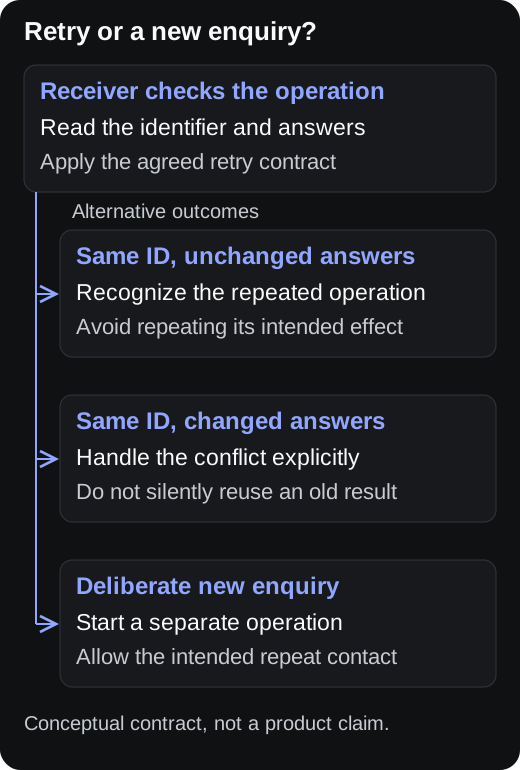
Conceptual receiving-system contract. This is not a diagram of a verified PopupForge API feature.
Keep a repeat enquiry possible
An email address identifies a contact channel, not the intent of every request made through it. Someone may ask about a kitchen project today and a bathroom project next month. Permanently rejecting the second request because the address already exists would lose useful information.
Agree what should happen when an existing contact submits again. Your CRM might keep one contact with two enquiries, while the form's submission store keeps separate records. The visible confirmation should describe the accepted enquiry without promising that a new contact was created.
Use a repeat-contact scenario in the test plan: submit one enquiry, deliberately start another, and change the service or message. Confirm that the second request remains available to the team. Then repeat the first operation as a retry and check that it does not create the same extra work.
If a business rule intentionally limits repeat requests, explain the rule and provide an appropriate next step. Do not disguise that business decision as an invalid email address. Visitors need to know whether to correct a field or contact the team about an existing request.
Follow the request into the receiving workflow
Inspect the full path you operate: form, submission store, CRM and notification system where applicable. Acceptance at one stage does not establish delivery at every later stage. A confirmation should make only the promise supported at that point.
For example, "Your callback request has been received" is different from "Your adviser has been notified." Use the second only if the system can support that claim. The callback form template can help keep the requested contact method and next step explicit.
Record where a repeat is detected and which later actions are suppressed or reused. If the service stores one enquiry but sends the same notification twice, the test still found a duplicate side effect. A clean lead list alone would have missed it.
Avoid using a screenshot of the confirmation as your only evidence. Keep a test reference that lets the person responsible for the integration find the receiving record. Exclude unnecessary personal answers from diagnostic notes and shared screenshots.
Test the uncomfortable cases before launch
Run each case with a fresh test operation unless the case specifically requires a retry. Keep a short record of the action, expected result and observed receiving record. Label any result you could not inspect as unverified.
- Double-click Submit quickly. Check accepted requests and notifications, not just whether the button changes color.
- Press Enter again while the first submission is pending. Verify that the keyboard follows the same pending-state rules.
- Delay the server response in a controlled test. Check that the interface stays understandable and does not announce success early.
- Simulate a lost response after acceptance. Exercise the supported recovery path and look for duplicate records or actions.
- Correct an answer after a confirmed rejection. Check that the intended revised request is accepted rather than replaying an old error indefinitely.
- Start a genuinely new enquiry with an existing email address. Confirm the business's intended repeat-contact behavior.
Include the installed form on a narrow mobile viewport, not only the builder preview. The sending message, error text and recovery button should remain visible and operable. A popup that hides its status below the viewport may encourage another attempt even when its backend behavior is correct.
Where the flow redirects to a confirmation page, test refreshing that page and using browser navigation. Where confirmation replaces the form in place, test closing and reopening the popup. Write down whether each action displays an existing outcome, begins a new operation or returns to an editable draft.
Measure accepted requests separately from attempts
Keep button presses, submission attempts and confirmed acceptance as different events in your measurement plan. A retry can legitimately add another attempt without adding another lead. Counting every press as a conversion would conceal that distinction.
The GA4 lead-tracking guide covers the broader event plan. Before using a success event to compare campaigns, verify which system state triggers it and how repeated confirmations are handled. Use a test request to trace the event to the outcome it is supposed to represent.
For a launch review, bring the designer, developer or integration owner the same small test record. "One intended enquiry, two attempts, one accepted request, one expected notification" is more actionable than "the form sometimes duplicates." If a stage cannot be observed, assign that check before treating the route as ready.
Sources
- MDN: Using the Fetch API, for HTTP responses and network-error handling.
- MDN: Idempotent, for request semantics and the limits of POST.
- Amazon Builders' Library: Making retries safe with idempotent APIs, for operation identifiers and explicit retry contracts.
- W3C: Understanding Status Messages, for accessible status feedback.
Reference
Terms in this guide
FAQ
Frequently asked questions
Is disabling the Submit button enough to prevent duplicate leads?
It can reduce repeated activation while a request is pending, but it does not establish how the server handles retries or how downstream actions are repeated. Test keyboard submission, lost responses and the receiving record as well as the visible button state.
Should a form reject every email address already in the lead list?
Not automatically. An existing contact may have a new enquiry. Define how the business records that new request, then distinguish it from another attempt at the same operation. A permanent email-based block can hide legitimate repeat interest.
Put the guide into practice
See three popup directions for your website.
Paste your URL and get three brand-matched popup concepts to review. It is free to try and does not require an account.
Generate 3 popup ideas free